
Callers
VIP, block list and spam.
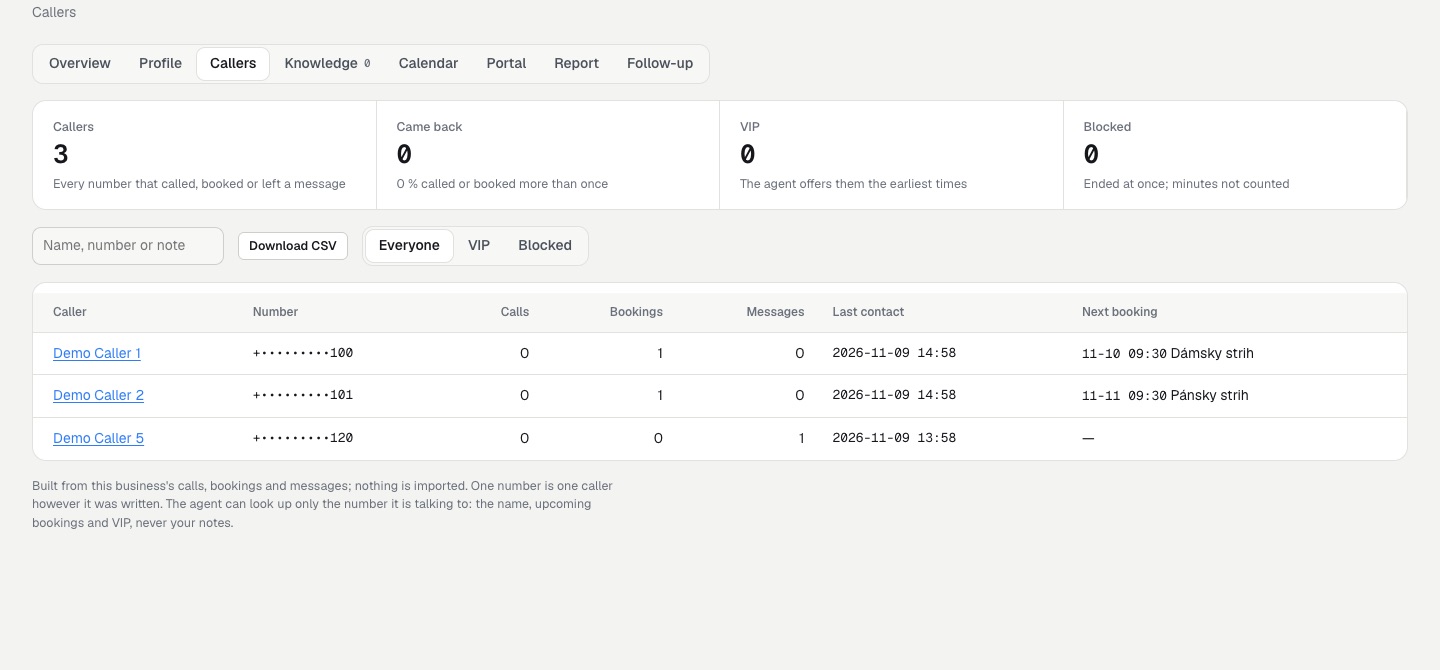
Each client has a Callers tab: every number that called, booked or left a message for that business, newest first, built from rows already in your database.
01The Callers tab
Nothing is imported: the list comes from this business's calls, bookings and messages. +421 905 111 222 and 0905 111 222 count as one caller, because the last nine digits decide.
Open a caller to see their history (calls, bookings and messages) and to set:
- Name: overrides the name callers gave. The agent may use it.
- Note for your team: stays in the console and is never sent to the agent.
- Tag: VIP (the agent offers the earliest times and a same-day callback) or Blocked (the agent says a short goodbye and ends the call).
Viewers see numbers masked (+•••••••••222) and can search only by the last three digits. A caller's page address carries an opaque id, never the number. Download CSV exports the list (Exports).
02How the agent recognises a caller
The caller_history tool returns, for the number the call comes from (ElevenLabs' system__caller_id), the name used before, upcoming bookings (service and time, never the booking code, so cancelling still needs the code from the confirmation) and whether the caller is a VIP. The agent cannot look up any other number, and your notes are never included. If the trunk does not pass the caller id, the tool answers "not known" and the agent asks as usual.
After you upgrade from 1.1, press Update N agents on the Clients page. Agents made before the tool existed get it then.
03Blocking and spam
To block a number, use the caller's page or Block the number on a call. Saving the block also updates the agent, because the block list is part of its instructions (at most 50 numbers per business). Calls already logged from that number, and every later one, are marked spam. Any call can also be marked spam by hand with Mark as spam on the call page.
Spam and blocked calls are left out of:
- the minutes used and the overage charge
- the analytics and the summary e-mails
- the monthly report, which lists them only as "spam kept away"
The Calls list hides spam by default. Choose Spam and blocked only to see it.
The call still reaches ElevenLabs and your trunk for the seconds it takes the agent to say goodbye, and those providers bill for them. Answerbell only stops counting the call against the business's plan.